eCitaro G (DLC Hamburg Linie 20)
MVG-Repaint | eCitaro G
Enthalten ist der Wagen 5012 der Münchner Verkehrsgesellschaft.
772 Downloads
4 Versionen
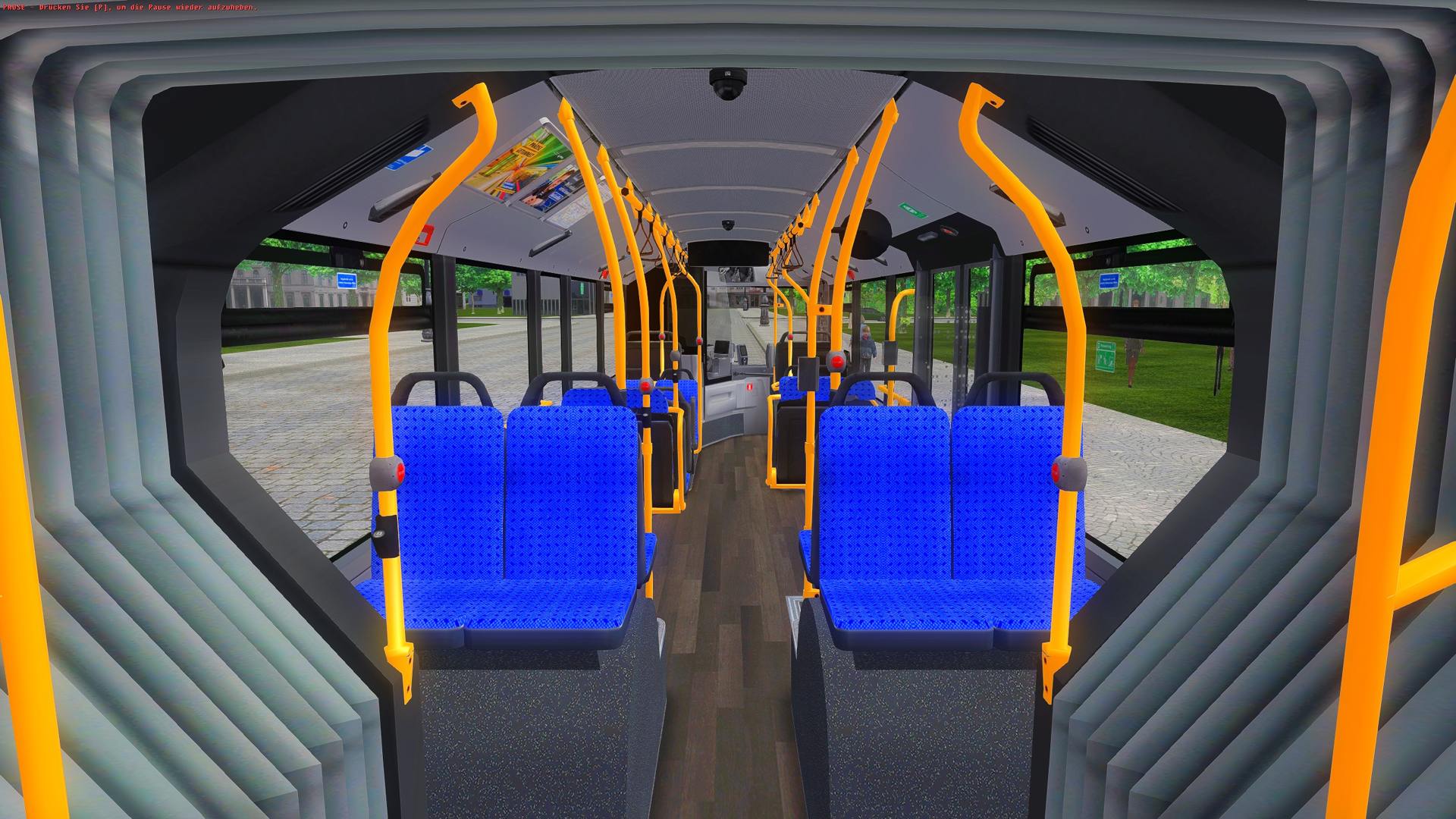
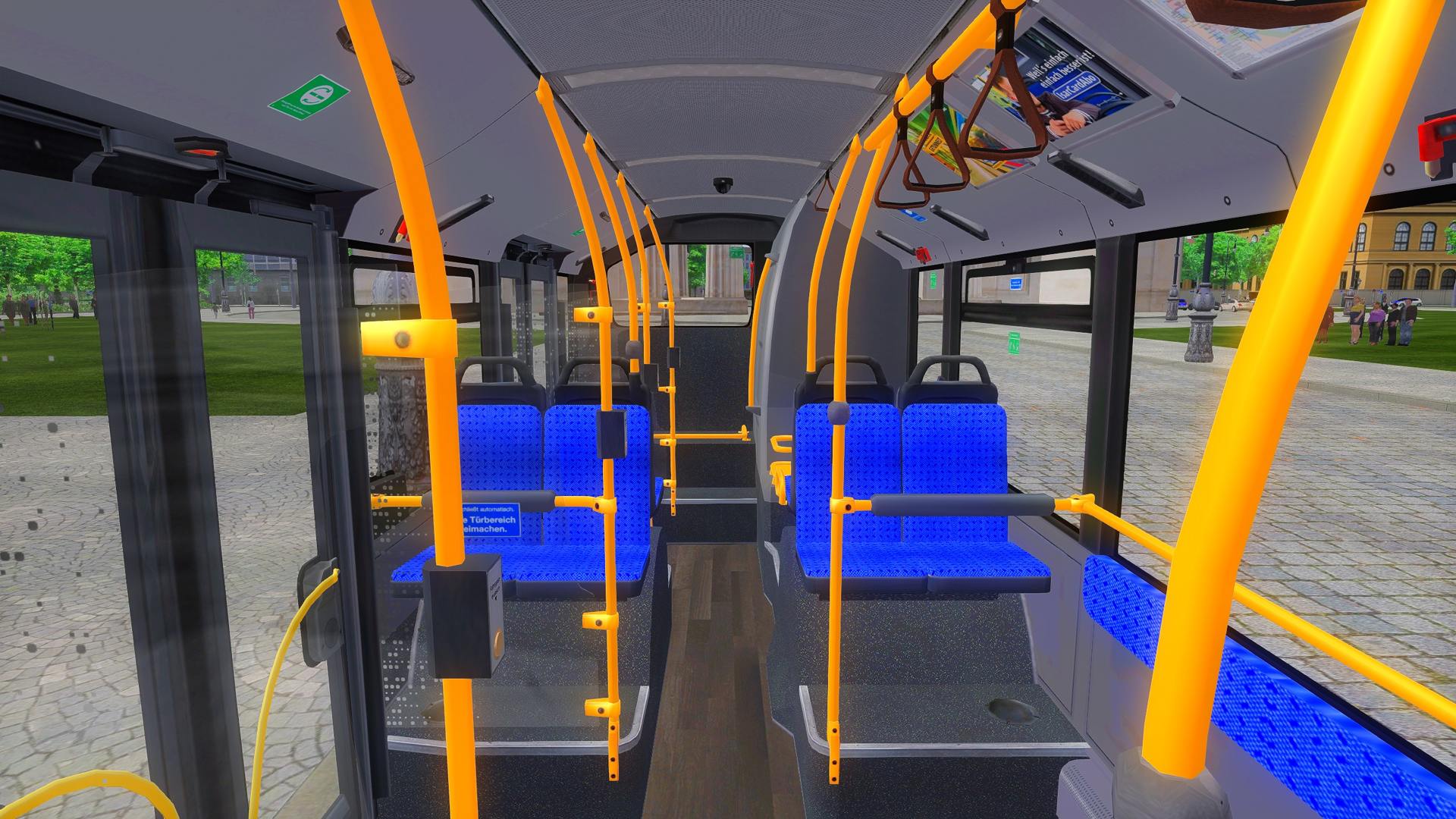
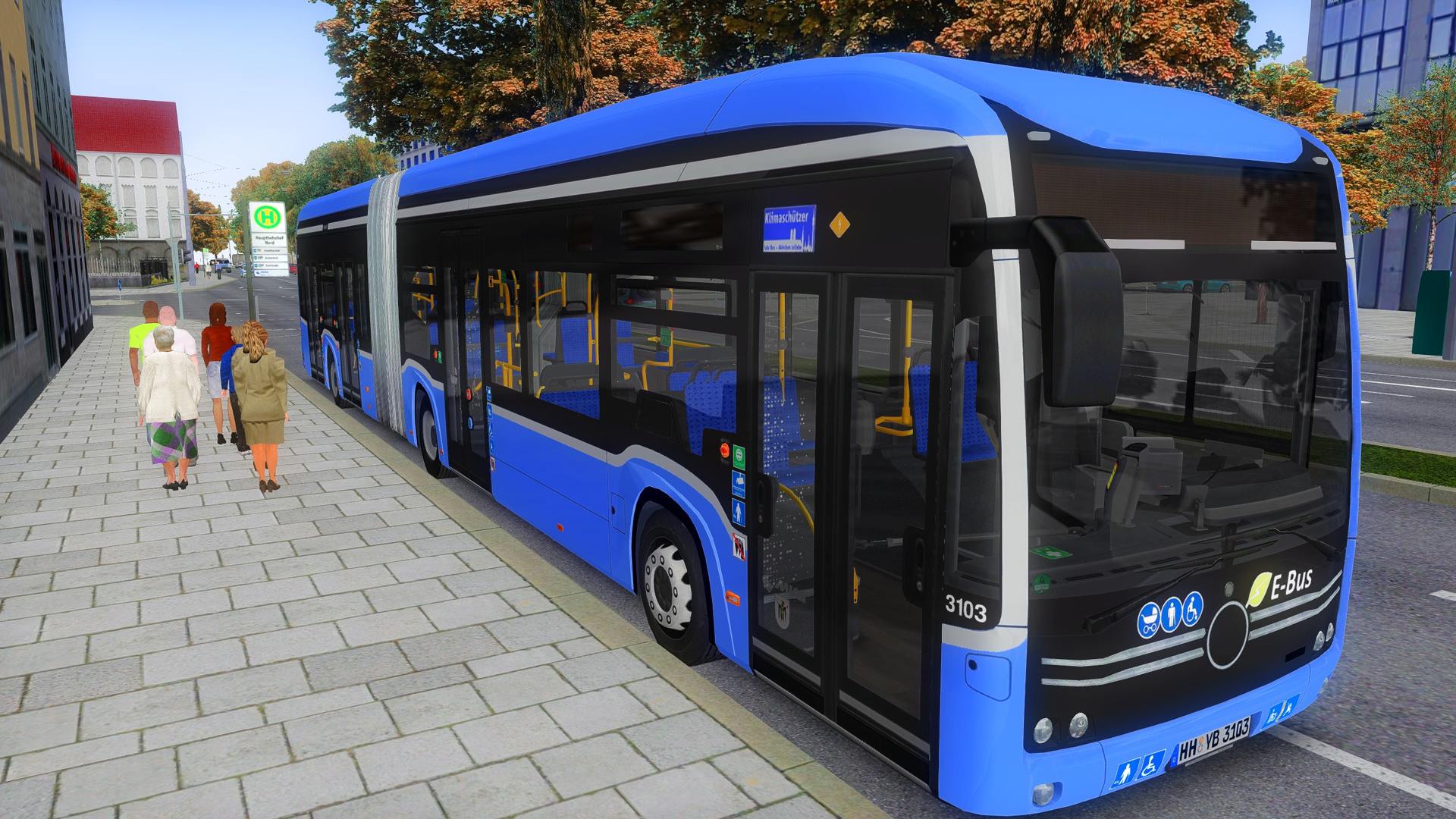
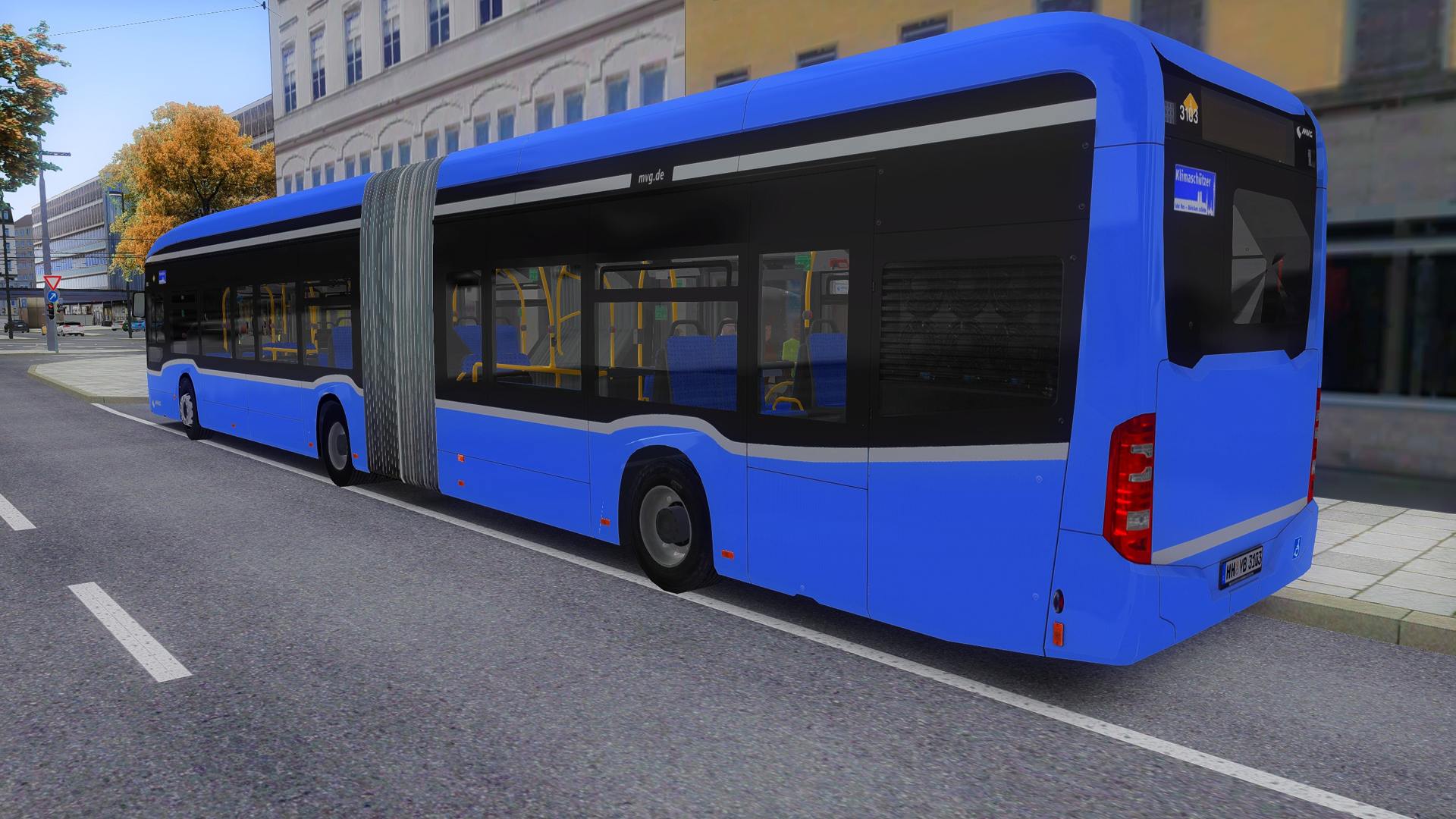
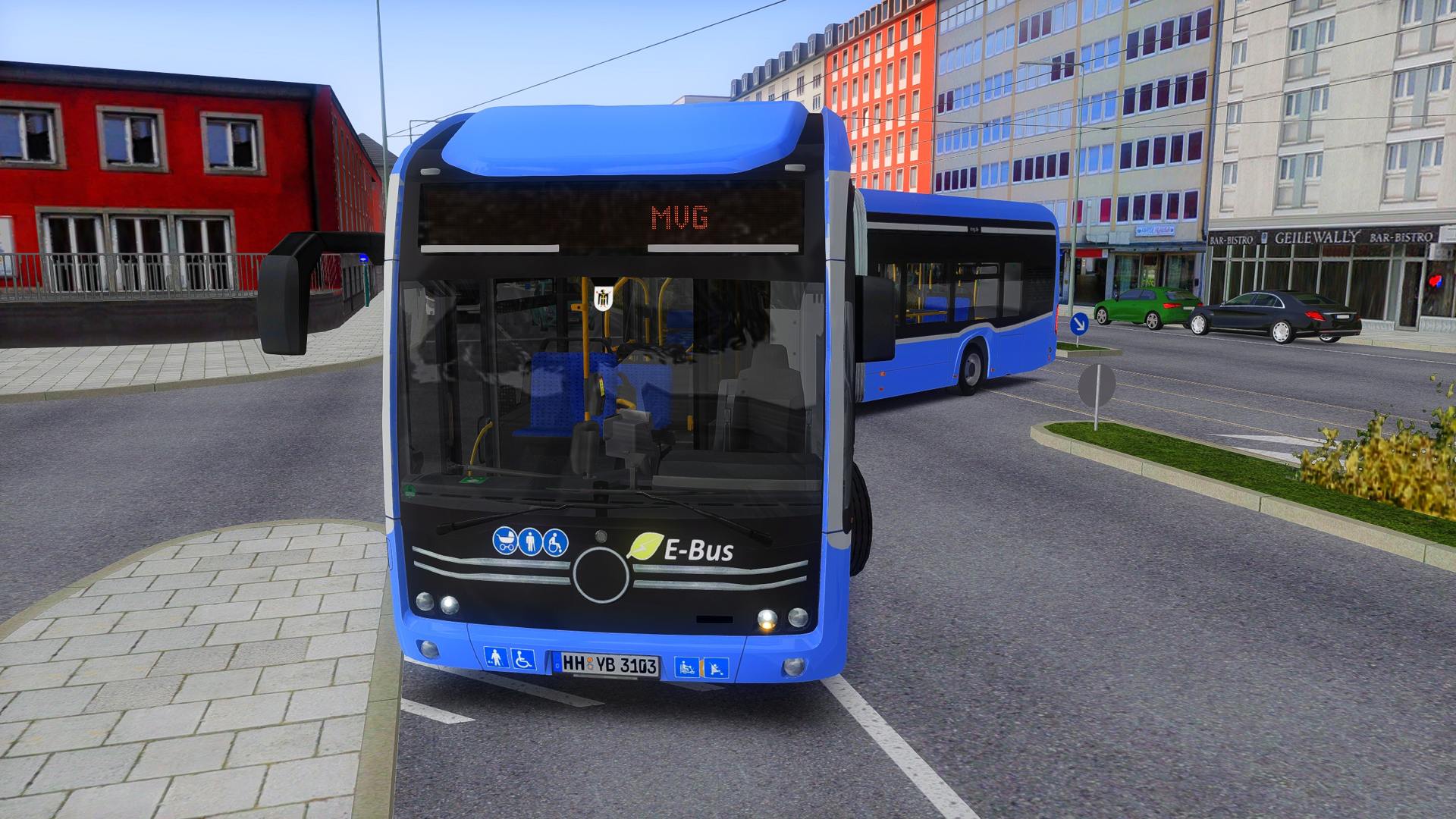
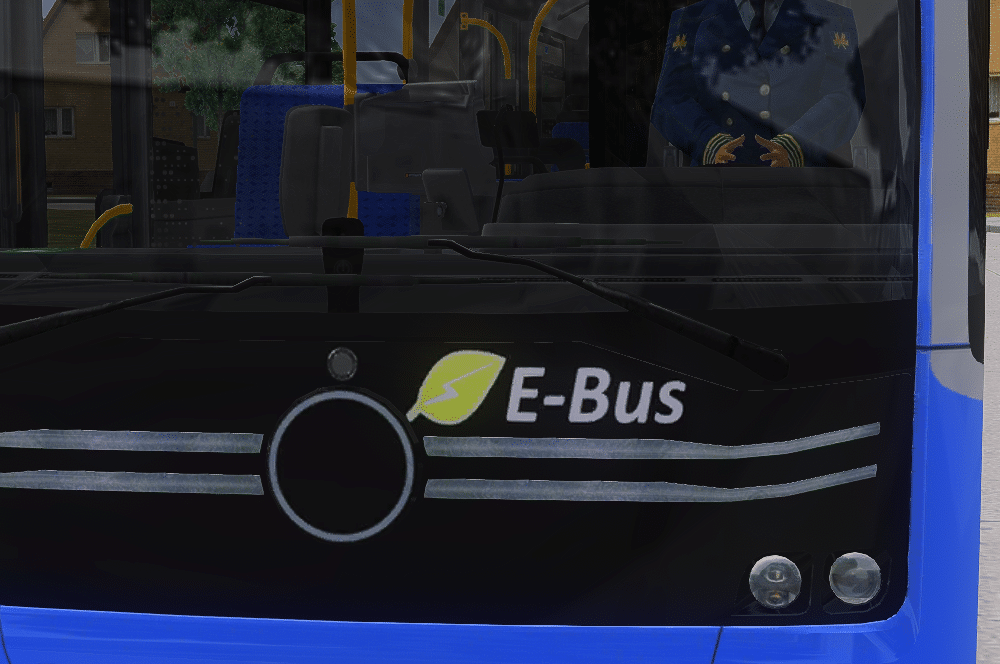
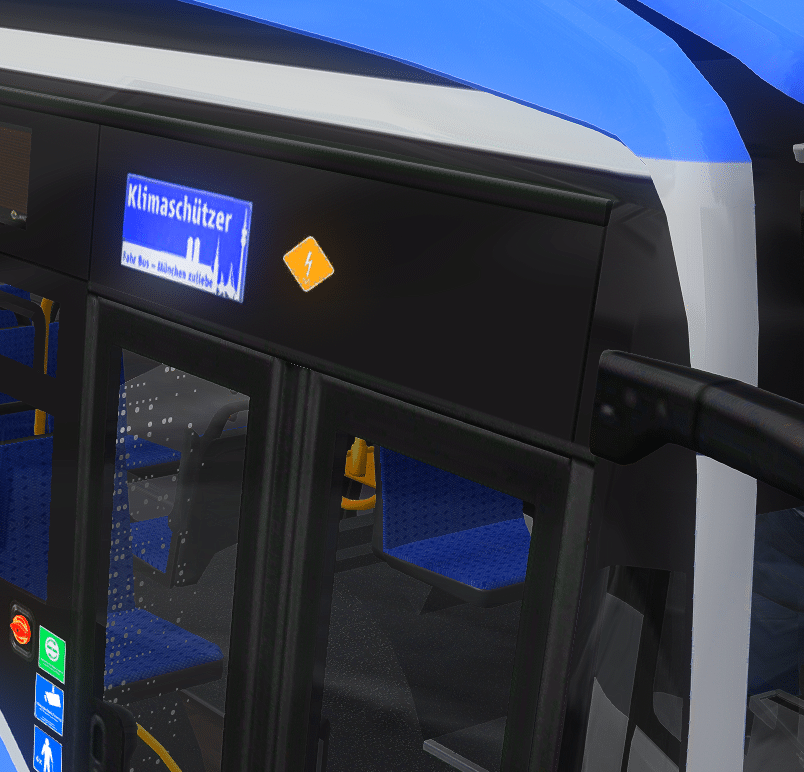
<p>In diesem Paket möchte ich euch mein Repaint der MVG, für den eCitaro G aus dem HH Linie 20 Addon, zum Download stellen.</p><p><br></p><p>Kennzeichen: M-VG 5012</p><p><br></p><p><woltlab-metacode data-name="attach" data-attributes="WyIxOTMwMjQiLCJub25lIiwiZmFsc2UiXQ=="></woltlab-metacode></p><h2><strong>BITTE BEACHTEN:</strong></h2>
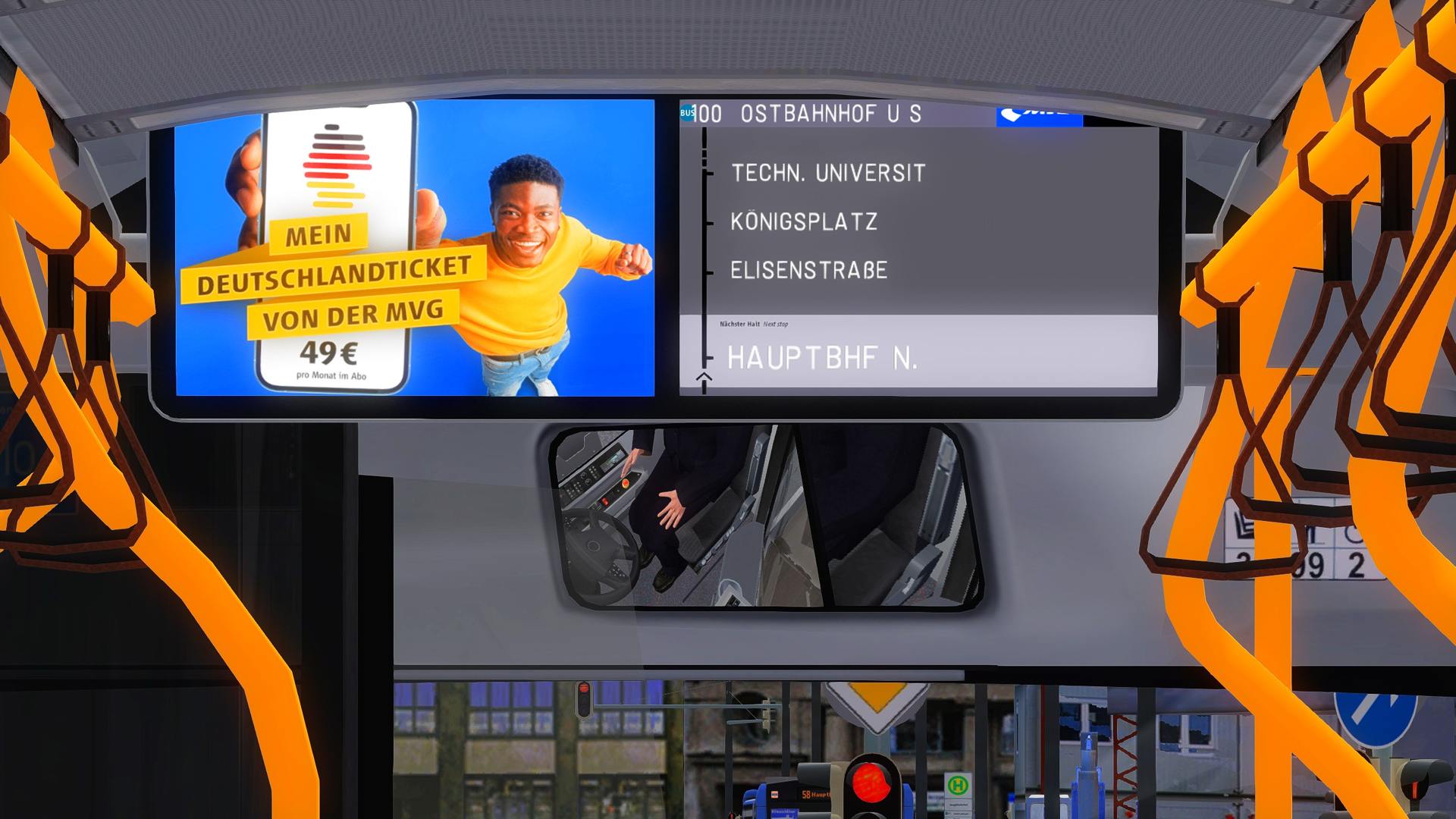
<p>Da ich nicht dazu berechtigt bin, die von mir bearbeitete model.cfg in dieser Datei mitzuliefern, müsstet ihr volgendes selbst eintragen.</p><woltlab-spoiler data-label="Damit die Fahrgastinformation und das Almex im Vorderwagen korrekt angezeigt werden (DE)"><p><strong>Schritt 1:</strong> Bitte in der model.cfg (..\OMSI 2\Vehicles\HH20_EBus2021\Model\model_21_main.cfg) direkt bei Textur-Changes folgendes eintragen:</p><pre>[CTCTexture]
farbschema_IA_1
21_fahrgastdisplay_R1.jpg
[CTCTexture]
farbschema_IA_2
21_fahrgastdisplay_R2.jpg
[CTCTexture]
farbschema_IA_3
21_fahrgastdisplay_R3.jpg
[CTCTexture]
farbschema_IA_4
21_fahrgastdisplay_R4.jpg
[CTCTexture]
farbschema_IA_5
21_fahrgastdisplay_R5.jpg
[CTCTexture]
farbschema_IA_6
21_fahrgastdisplay_R6.jpg
[CTCTexture]
farbschema_IA_7
21_fahrgastdisplay_R7.jpg
[CTCTexture]
farbschema_Werbung_1
fahrgastdisplay_L1.jpg
[CTCTexture]
farbschema_Werbung_2
fahrgastdisplay_L2.jpg
[CTCTexture]
farbschema_Werbung_3
fahrgastdisplay_L3.jpg
[CTCTexture]
farbschema_Werbung_4
fahrgastdisplay_L4.jpg
[CTCTexture]
farbschema_Werbung_5
fahrgastdisplay_L5.jpg
[CTCTexture]
farbschema_Werbung_6
fahrgastdisplay_L6.jpg
[CTCTexture]
farbschema_Werbung_7
fahrgastdisplay_L7.jpg
[CTCTexture]
farbschema_Werbung_8
fahrgastdisplay_L8.jpg
[CTCTexture]
farbschema_almex
17_almex_s_0.jpg
[CTCTexture]
farbschema_zettel
17_almex_zettel.jpg
[CTCTexture]
farbschema_pvs1
pvs_display_1.jpg
[CTCTexture]
farbschema_pvs2
pvs_display_2.jpg
[CTCTexture]
farbschema_pvs3
pvs_display_3.jpg
[CTCTexture]
farbschema_pvs4
pvs_display_4.jpg
[CTCTexture]
farbschema_pvs5
pvs_display_5.jpg
[CTCTexture]
farbschema_pvs6
pvs_display_6.jpg
[CTCTexture]
farbschema_pvs7
pvs_display_7.jpg
[CTCTexture]
farbschema_pvs8
pvs_display_8.jpg
[CTCTexture]
farbschema_pvs9
pvs_display_9.jpg</pre>
<p><br></p></woltlab-spoiler>
<woltlab-spoiler data-label="Damit die Fahrgastinformation im Nachläufer korrekt angezeigt wird (DE)"><p><strong>Schritt 1:</strong> Bitte in der model.cfg (..\OMSI 2\Vehicles\HH20_EBus2021\Model\model_21_T.cfg) direkt bei Textur-Changes folgendes eintragen:</p><pre>[CTCTexture]
farbschema_IA_1
21_fahrgastdisplay_R1.jpg
[CTCTexture]
farbschema_IA_2
21_fahrgastdisplay_R2.jpg
[CTCTexture]
farbschema_IA_3
21_fahrgastdisplay_R3.jpg
[CTCTexture]
farbschema_IA_4
21_fahrgastdisplay_R4.jpg
[CTCTexture]
farbschema_IA_5
21_fahrgastdisplay_R5.jpg
[CTCTexture]
farbschema_IA_6
21_fahrgastdisplay_R6.jpg
[CTCTexture]
farbschema_IA_7
21_fahrgastdisplay_R7.jpg
[CTCTexture]
farbschema_Werbung_1
fahrgastdisplay_L1.jpg
[CTCTexture]
farbschema_Werbung_2
fahrgastdisplay_L2.jpg
[CTCTexture]
farbschema_Werbung_3
fahrgastdisplay_L3.jpg
[CTCTexture]
farbschema_Werbung_4
fahrgastdisplay_L4.jpg
[CTCTexture]
farbschema_Werbung_5
fahrgastdisplay_L5.jpg
[CTCTexture]
farbschema_Werbung_6
fahrgastdisplay_L6.jpg
[CTCTexture]
farbschema_Werbung_7
fahrgastdisplay_L7.jpg
[CTCTexture]
farbschema_Werbung_8
fahrgastdisplay_L8.jpg</pre>
</woltlab-spoiler>
<p>------------------------------------------------------------------------------------------------------------------------------------------------------------------------------------------------------</p><p><woltlab-metacode data-name="attach" data-attributes="WyIxOTMwMjYiLCJub25lIiwiZmFsc2UiXQ=="></woltlab-metacode></p><h2><strong>PLEASE NOTE:</strong></h2>
<woltlab-spoiler data-label="So that the passenger information and the Almex are displayed correctly in the front end (EN)"><p><strong>Step 1:</strong> Please enter the following in the model.cfg (..\OMSI 2\Vehicles\HH20_EBus2021\Model\model_21_main.cfg) directly under texture changes:</p><pre>[CTCTexture]
farbschema_IA_1
21_fahrgastdisplay_R1.jpg
[CTCTexture]
farbschema_IA_2
21_fahrgastdisplay_R2.jpg
[CTCTexture]
farbschema_IA_3
21_fahrgastdisplay_R3.jpg
[CTCTexture]
farbschema_IA_4
21_fahrgastdisplay_R4.jpg
[CTCTexture]
farbschema_IA_5
21_fahrgastdisplay_R5.jpg
[CTCTexture]
farbschema_IA_6
21_fahrgastdisplay_R6.jpg
[CTCTexture]
farbschema_IA_7
21_fahrgastdisplay_R7.jpg
[CTCTexture]
farbschema_Werbung_1
fahrgastdisplay_L1.jpg
[CTCTexture]
farbschema_Werbung_2
fahrgastdisplay_L2.jpg
[CTCTexture]
farbschema_Werbung_3
fahrgastdisplay_L3.jpg
[CTCTexture]
farbschema_Werbung_4
fahrgastdisplay_L4.jpg
[CTCTexture]
farbschema_Werbung_5
fahrgastdisplay_L5.jpg
[CTCTexture]
farbschema_Werbung_6
fahrgastdisplay_L6.jpg
[CTCTexture]
farbschema_Werbung_7
fahrgastdisplay_L7.jpg
[CTCTexture]
farbschema_Werbung_8
fahrgastdisplay_L8.jpg
[CTCTexture]
farbschema_almex
17_almex_s_0.jpg
[CTCTexture]
farbschema_zettel
17_almex_zettel.jpg
[CTCTexture]
farbschema_pvs1
pvs_display_1.jpg
[CTCTexture]
farbschema_pvs2
pvs_display_2.jpg
[CTCTexture]
farbschema_pvs3
pvs_display_3.jpg
[CTCTexture]
farbschema_pvs4
pvs_display_4.jpg
[CTCTexture]
farbschema_pvs5
pvs_display_5.jpg
[CTCTexture]
farbschema_pvs6
pvs_display_6.jpg
[CTCTexture]
farbschema_pvs7
pvs_display_7.jpg
[CTCTexture]
farbschema_pvs8
pvs_display_8.jpg
[CTCTexture]
farbschema_pvs9
pvs_display_9.jpg</pre>
<p><br></p></woltlab-spoiler>
<woltlab-spoiler data-label="So that the passenger information is displayed correctly in the trailer (EN)"><p><strong>Step 1:</strong> Please enter the following in the model.cfg (..\OMSI 2\Vehicles\HH20_EBus2021\Model\model_21_T.cfg) directly for texture changes:</p><pre>[CTCTexture]
farbschema_IA_1
21_fahrgastdisplay_R1.jpg
[CTCTexture]
farbschema_IA_2
21_fahrgastdisplay_R2.jpg
[CTCTexture]
farbschema_IA_3
21_fahrgastdisplay_R3.jpg
[CTCTexture]
farbschema_IA_4
21_fahrgastdisplay_R4.jpg
[CTCTexture]
farbschema_IA_5
21_fahrgastdisplay_R5.jpg
[CTCTexture]
farbschema_IA_6
21_fahrgastdisplay_R6.jpg
[CTCTexture]
farbschema_IA_7
21_fahrgastdisplay_R7.jpg
[CTCTexture]
farbschema_Werbung_1
fahrgastdisplay_L1.jpg
[CTCTexture]
farbschema_Werbung_2
fahrgastdisplay_L2.jpg
[CTCTexture]
farbschema_Werbung_3
fahrgastdisplay_L3.jpg
[CTCTexture]
farbschema_Werbung_4
fahrgastdisplay_L4.jpg
[CTCTexture]
farbschema_Werbung_5
fahrgastdisplay_L5.jpg
[CTCTexture]
farbschema_Werbung_6
fahrgastdisplay_L6.jpg
[CTCTexture]
farbschema_Werbung_7
fahrgastdisplay_L7.jpg
[CTCTexture]
farbschema_Werbung_8
fahrgastdisplay_L8.jpg</pre>
</woltlab-spoiler>
<p><br></p><p><woltlab-metacode data-name="attach" data-attributes="WyIyMDQzNTAiLCJub25lIiwiZmFsc2UiXQ=="></woltlab-metacode></p><p><br></p><p><woltlab-metacode data-name="attach" data-attributes="WyIyMDQzNTEiLCJub25lIiwiZmFsc2UiXQ=="></woltlab-metacode></p><p><br></p><p><woltlab-metacode data-name="attach" data-attributes="WyIxOTI3NjYiLCJub25lIiwiZmFsc2UiXQ=="></woltlab-metacode></p><p><br></p><p><woltlab-metacode data-name="attach" data-attributes="WyIxOTI3NjciLCJub25lIiwiZmFsc2UiXQ=="></woltlab-metacode></p>
<p>Da ich nicht dazu berechtigt bin, die von mir bearbeitete model.cfg in dieser Datei mitzuliefern, müsstet ihr volgendes selbst eintragen.</p><woltlab-spoiler data-label="Damit die Fahrgastinformation und das Almex im Vorderwagen korrekt angezeigt werden (DE)"><p><strong>Schritt 1:</strong> Bitte in der model.cfg (..\OMSI 2\Vehicles\HH20_EBus2021\Model\model_21_main.cfg) direkt bei Textur-Changes folgendes eintragen:</p><pre>[CTCTexture]
farbschema_IA_1
21_fahrgastdisplay_R1.jpg
[CTCTexture]
farbschema_IA_2
21_fahrgastdisplay_R2.jpg
[CTCTexture]
farbschema_IA_3
21_fahrgastdisplay_R3.jpg
[CTCTexture]
farbschema_IA_4
21_fahrgastdisplay_R4.jpg
[CTCTexture]
farbschema_IA_5
21_fahrgastdisplay_R5.jpg
[CTCTexture]
farbschema_IA_6
21_fahrgastdisplay_R6.jpg
[CTCTexture]
farbschema_IA_7
21_fahrgastdisplay_R7.jpg
[CTCTexture]
farbschema_Werbung_1
fahrgastdisplay_L1.jpg
[CTCTexture]
farbschema_Werbung_2
fahrgastdisplay_L2.jpg
[CTCTexture]
farbschema_Werbung_3
fahrgastdisplay_L3.jpg
[CTCTexture]
farbschema_Werbung_4
fahrgastdisplay_L4.jpg
[CTCTexture]
farbschema_Werbung_5
fahrgastdisplay_L5.jpg
[CTCTexture]
farbschema_Werbung_6
fahrgastdisplay_L6.jpg
[CTCTexture]
farbschema_Werbung_7
fahrgastdisplay_L7.jpg
[CTCTexture]
farbschema_Werbung_8
fahrgastdisplay_L8.jpg
[CTCTexture]
farbschema_almex
17_almex_s_0.jpg
[CTCTexture]
farbschema_zettel
17_almex_zettel.jpg
[CTCTexture]
farbschema_pvs1
pvs_display_1.jpg
[CTCTexture]
farbschema_pvs2
pvs_display_2.jpg
[CTCTexture]
farbschema_pvs3
pvs_display_3.jpg
[CTCTexture]
farbschema_pvs4
pvs_display_4.jpg
[CTCTexture]
farbschema_pvs5
pvs_display_5.jpg
[CTCTexture]
farbschema_pvs6
pvs_display_6.jpg
[CTCTexture]
farbschema_pvs7
pvs_display_7.jpg
[CTCTexture]
farbschema_pvs8
pvs_display_8.jpg
[CTCTexture]
farbschema_pvs9
pvs_display_9.jpg</pre>
<p><br></p></woltlab-spoiler>
<woltlab-spoiler data-label="Damit die Fahrgastinformation im Nachläufer korrekt angezeigt wird (DE)"><p><strong>Schritt 1:</strong> Bitte in der model.cfg (..\OMSI 2\Vehicles\HH20_EBus2021\Model\model_21_T.cfg) direkt bei Textur-Changes folgendes eintragen:</p><pre>[CTCTexture]
farbschema_IA_1
21_fahrgastdisplay_R1.jpg
[CTCTexture]
farbschema_IA_2
21_fahrgastdisplay_R2.jpg
[CTCTexture]
farbschema_IA_3
21_fahrgastdisplay_R3.jpg
[CTCTexture]
farbschema_IA_4
21_fahrgastdisplay_R4.jpg
[CTCTexture]
farbschema_IA_5
21_fahrgastdisplay_R5.jpg
[CTCTexture]
farbschema_IA_6
21_fahrgastdisplay_R6.jpg
[CTCTexture]
farbschema_IA_7
21_fahrgastdisplay_R7.jpg
[CTCTexture]
farbschema_Werbung_1
fahrgastdisplay_L1.jpg
[CTCTexture]
farbschema_Werbung_2
fahrgastdisplay_L2.jpg
[CTCTexture]
farbschema_Werbung_3
fahrgastdisplay_L3.jpg
[CTCTexture]
farbschema_Werbung_4
fahrgastdisplay_L4.jpg
[CTCTexture]
farbschema_Werbung_5
fahrgastdisplay_L5.jpg
[CTCTexture]
farbschema_Werbung_6
fahrgastdisplay_L6.jpg
[CTCTexture]
farbschema_Werbung_7
fahrgastdisplay_L7.jpg
[CTCTexture]
farbschema_Werbung_8
fahrgastdisplay_L8.jpg</pre>
</woltlab-spoiler>
<p>------------------------------------------------------------------------------------------------------------------------------------------------------------------------------------------------------</p><p><woltlab-metacode data-name="attach" data-attributes="WyIxOTMwMjYiLCJub25lIiwiZmFsc2UiXQ=="></woltlab-metacode></p><h2><strong>PLEASE NOTE:</strong></h2>
<woltlab-spoiler data-label="So that the passenger information and the Almex are displayed correctly in the front end (EN)"><p><strong>Step 1:</strong> Please enter the following in the model.cfg (..\OMSI 2\Vehicles\HH20_EBus2021\Model\model_21_main.cfg) directly under texture changes:</p><pre>[CTCTexture]
farbschema_IA_1
21_fahrgastdisplay_R1.jpg
[CTCTexture]
farbschema_IA_2
21_fahrgastdisplay_R2.jpg
[CTCTexture]
farbschema_IA_3
21_fahrgastdisplay_R3.jpg
[CTCTexture]
farbschema_IA_4
21_fahrgastdisplay_R4.jpg
[CTCTexture]
farbschema_IA_5
21_fahrgastdisplay_R5.jpg
[CTCTexture]
farbschema_IA_6
21_fahrgastdisplay_R6.jpg
[CTCTexture]
farbschema_IA_7
21_fahrgastdisplay_R7.jpg
[CTCTexture]
farbschema_Werbung_1
fahrgastdisplay_L1.jpg
[CTCTexture]
farbschema_Werbung_2
fahrgastdisplay_L2.jpg
[CTCTexture]
farbschema_Werbung_3
fahrgastdisplay_L3.jpg
[CTCTexture]
farbschema_Werbung_4
fahrgastdisplay_L4.jpg
[CTCTexture]
farbschema_Werbung_5
fahrgastdisplay_L5.jpg
[CTCTexture]
farbschema_Werbung_6
fahrgastdisplay_L6.jpg
[CTCTexture]
farbschema_Werbung_7
fahrgastdisplay_L7.jpg
[CTCTexture]
farbschema_Werbung_8
fahrgastdisplay_L8.jpg
[CTCTexture]
farbschema_almex
17_almex_s_0.jpg
[CTCTexture]
farbschema_zettel
17_almex_zettel.jpg
[CTCTexture]
farbschema_pvs1
pvs_display_1.jpg
[CTCTexture]
farbschema_pvs2
pvs_display_2.jpg
[CTCTexture]
farbschema_pvs3
pvs_display_3.jpg
[CTCTexture]
farbschema_pvs4
pvs_display_4.jpg
[CTCTexture]
farbschema_pvs5
pvs_display_5.jpg
[CTCTexture]
farbschema_pvs6
pvs_display_6.jpg
[CTCTexture]
farbschema_pvs7
pvs_display_7.jpg
[CTCTexture]
farbschema_pvs8
pvs_display_8.jpg
[CTCTexture]
farbschema_pvs9
pvs_display_9.jpg</pre>
<p><br></p></woltlab-spoiler>
<woltlab-spoiler data-label="So that the passenger information is displayed correctly in the trailer (EN)"><p><strong>Step 1:</strong> Please enter the following in the model.cfg (..\OMSI 2\Vehicles\HH20_EBus2021\Model\model_21_T.cfg) directly for texture changes:</p><pre>[CTCTexture]
farbschema_IA_1
21_fahrgastdisplay_R1.jpg
[CTCTexture]
farbschema_IA_2
21_fahrgastdisplay_R2.jpg
[CTCTexture]
farbschema_IA_3
21_fahrgastdisplay_R3.jpg
[CTCTexture]
farbschema_IA_4
21_fahrgastdisplay_R4.jpg
[CTCTexture]
farbschema_IA_5
21_fahrgastdisplay_R5.jpg
[CTCTexture]
farbschema_IA_6
21_fahrgastdisplay_R6.jpg
[CTCTexture]
farbschema_IA_7
21_fahrgastdisplay_R7.jpg
[CTCTexture]
farbschema_Werbung_1
fahrgastdisplay_L1.jpg
[CTCTexture]
farbschema_Werbung_2
fahrgastdisplay_L2.jpg
[CTCTexture]
farbschema_Werbung_3
fahrgastdisplay_L3.jpg
[CTCTexture]
farbschema_Werbung_4
fahrgastdisplay_L4.jpg
[CTCTexture]
farbschema_Werbung_5
fahrgastdisplay_L5.jpg
[CTCTexture]
farbschema_Werbung_6
fahrgastdisplay_L6.jpg
[CTCTexture]
farbschema_Werbung_7
fahrgastdisplay_L7.jpg
[CTCTexture]
farbschema_Werbung_8
fahrgastdisplay_L8.jpg</pre>
</woltlab-spoiler>
<p><br></p><p><woltlab-metacode data-name="attach" data-attributes="WyIyMDQzNTAiLCJub25lIiwiZmFsc2UiXQ=="></woltlab-metacode></p><p><br></p><p><woltlab-metacode data-name="attach" data-attributes="WyIyMDQzNTEiLCJub25lIiwiZmFsc2UiXQ=="></woltlab-metacode></p><p><br></p><p><woltlab-metacode data-name="attach" data-attributes="WyIxOTI3NjYiLCJub25lIiwiZmFsc2UiXQ=="></woltlab-metacode></p><p><br></p><p><woltlab-metacode data-name="attach" data-attributes="WyIxOTI3NjciLCJub25lIiwiZmFsc2UiXQ=="></woltlab-metacode></p>
Bilder