Repainttemplates
Mercedes-Benz Citaro 2 (Berlin/Neutral) - CSF-Sitzbezüge / Vorlage
Eine transparente Vorlage für die CSF-Sitze mit Schatten für den Citaro 2 von Mx200
438 Downloads
2 Versionen
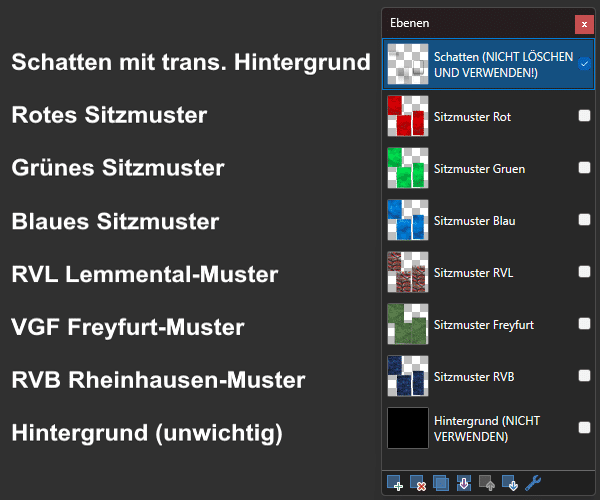
<p><span style="font-family:'Lucida Sans Unicode', 'Lucida Grande', sans-serif;"><woltlab-metacode data-name="flag" data-attributes="WyJkZSJd"></woltlab-metacode><br></span></p><p><span style="font-family:'Lucida Sans Unicode', 'Lucida Grande', sans-serif;"><span style="font-size: 12pt;"><strong>Ein CSF-Sitzbezug-Template für das C2-Paket von Mx200</strong></span></span></p><p><span style="font-family:'Lucida Sans Unicode', 'Lucida Grande', sans-serif;"><br></span></p><p><span style="font-family:'Lucida Sans Unicode', 'Lucida Grande', sans-serif;">Nach dem Installieren dieser Vorlage wird im "Texture"-Ordner des C2 der Ordner "Sitzmuster" liegen.</span></p><p><span style="font-family:'Lucida Sans Unicode', 'Lucida Grande', sans-serif;">Dort enthalten ist eine .pdn-Datei welche unter anderem drei Ebenen für verschiedene Designs wie "RVL Lemmental", "RVB Rheinhausen" und "VGF Freyfurt" bietet. Ebenso sind drei Ebenen mit zivilen, leicht gemusterten roten, grünen und blauen Sitzbezügen.</span></p><p><strong><span style="font-family:'Lucida Sans Unicode', 'Lucida Grande', sans-serif;">Erklärung der Ebenen:</span></strong></p><p><strong><span style="font-family:'Lucida Sans Unicode', 'Lucida Grande', sans-serif;"><woltlab-metacode data-name="attach" data-attributes="WyIxNTk4MjAiLCJub25lIiwiZmFsc2UiXQ=="></woltlab-metacode></span></strong></p><p><strong><span style="font-family:'Lucida Sans Unicode', 'Lucida Grande', sans-serif;"><br></span></strong></p><p><span style="font-family:'Lucida Sans Unicode', 'Lucida Grande', sans-serif;"><strong>Copyright</strong>: Macht damit was ihr wollt</span></p><p><span style="font-family:'Lucida Sans Unicode', 'Lucida Grande', sans-serif;"><strong>Installation</strong>: Den Ordner entpacken und den OMSI-Ordner einfach ins Hauptverzeichnis schieben.</span></p><p><span style="font-family:'Lucida Sans Unicode', 'Lucida Grande', sans-serif;"><br></span></p><p><span style="font-family:'Lucida Sans Unicode', 'Lucida Grande', sans-serif;"><woltlab-metacode data-name="flag" data-attributes="WyJlbiJd"></woltlab-metacode><woltlab-metacode data-name="flag" data-attributes="WyJ1cyJd"></woltlab-metacode></span></p><p><span style="font-size: 12pt;"><strong><span style="font-family:'Lucida Sans Unicode', 'Lucida Grande', sans-serif;"></span></strong></span></p><p><span style="font-family:'Lucida Sans Unicode', 'Lucida Grande', sans-serif;"><span style="font-size: 12pt;"><strong>A seat cover template for the C2 package from Mx200</strong></span></span></p><p><span style="font-family:'Lucida Sans Unicode', 'Lucida Grande', sans-serif;"><br></span></p><p><span style="font-family:'Lucida Sans Unicode', 'Lucida Grande', sans-serif;">After installing this template, the folder "Sitzmuster" will be located in the "Texture" folder of the C2</span></p><p><span style="font-family:'Lucida Sans Unicode', 'Lucida Grande', sans-serif;">There you will find a .pdn file with three layers for different designs like "RVL Lemmental", "RVB Rheinhausen" and "VGF Freyfurt". Also included are three layers with civilian, slightly patterned red, green and blue seat covers.</span></p><p><span style="font-family:'Lucida Sans Unicode', 'Lucida Grande', sans-serif;"><strong></strong></span></p><p><strong><span style="font-family:'Lucida Sans Unicode', 'Lucida Grande', sans-serif;">Explanation of the layers:</span></strong></p><p><strong><span style="font-family:'Lucida Sans Unicode', 'Lucida Grande', sans-serif;"><woltlab-metacode data-name="attach" data-attributes="WyIxNTk4MjAiLCJub25lIiwiZmFsc2UiXQ=="></woltlab-metacode></span></strong></p><p><span style="font-family:'Lucida Sans Unicode', 'Lucida Grande', sans-serif;"><strong></strong></span></p><p><span style="font-family:'Lucida Sans Unicode', 'Lucida Grande', sans-serif;"><br></span></p><p><span style="font-family:'Lucida Sans Unicode', 'Lucida Grande', sans-serif;"><strong>Copyright</strong>: Do what ya wanna do with it</span></p><p><span style="font-family:'Lucida Sans Unicode', 'Lucida Grande', sans-serif;"><strong></strong></span></p><p><span style="font-family:'Lucida Sans Unicode', 'Lucida Grande', sans-serif;"><strong>Installation</strong>: Unzip the folder and simply move the OMSI folder to the root directory.</span><strong></strong></p>
Bilder